
Use path tracing in Three.js
Updated on . Tested with three.js r180, R3F 9 and drei 10.
Path tracing makes your three.js scenes look more realistic, which is very useful in a model configurator setting. Say a buyer has just configured a sofa, and you want a great image for their cart. By path tracing the scene, you simulate how light actually bounces around in real life, and you end up with an image that looks like a professional photo.

To path trace your three.js scene directly in the browser, do the following:
- Install
three-gpu-pathtracerandthree-mesh-bvh. - Create a
WebGLPathTracerwith yourWebGLRenderer. - Call
pathTracer.setScene(scene, camera)after your models and your HDRI have loaded. - Call
pathTracer.renderSample()every frame instead ofrenderer.render(). - Call
pathTracer.updateCamera()when the camera moves, andpathTracer.updateMaterials()when a material changes.
The picture starts grainy and gets cleaner every frame, so you need to wait a few seconds before it is ready to save.
Set up the path tracer
Install the path tracer and the library it uses to find what each ray hits.
npm install three-gpu-pathtracer three-mesh-bvhThen build your scene as usual and hand it to a WebGLPathTracer once everything has loaded.
import * as THREE from 'three';
import { GLTFLoader } from 'three/addons/loaders/GLTFLoader.js';
import { HDRLoader } from 'three/addons/loaders/HDRLoader.js';
import { WebGLPathTracer } from 'three-gpu-pathtracer';const gltf = await new GLTFLoader().loadAsync('/demo/models/Sofa_01/Sofa_01_2k.glb');
sofa.add(gltf.scene);
sofa.position.set(-0.35, 0, -0.6);const pathTracer = new WebGLPathTracer(renderer);
pathTracer.setScene(scene, camera);
renderer.setAnimationLoop(() => {
pathTracer.renderSample();
});setScene reads every mesh, material, texture and light in the scene and builds the data the path tracer needs. It takes a moment on a big model, so call it once after loading, not every frame. Until the first few samples are ready, renderSample() draws the scene the normal three.js way, so the canvas is never empty.
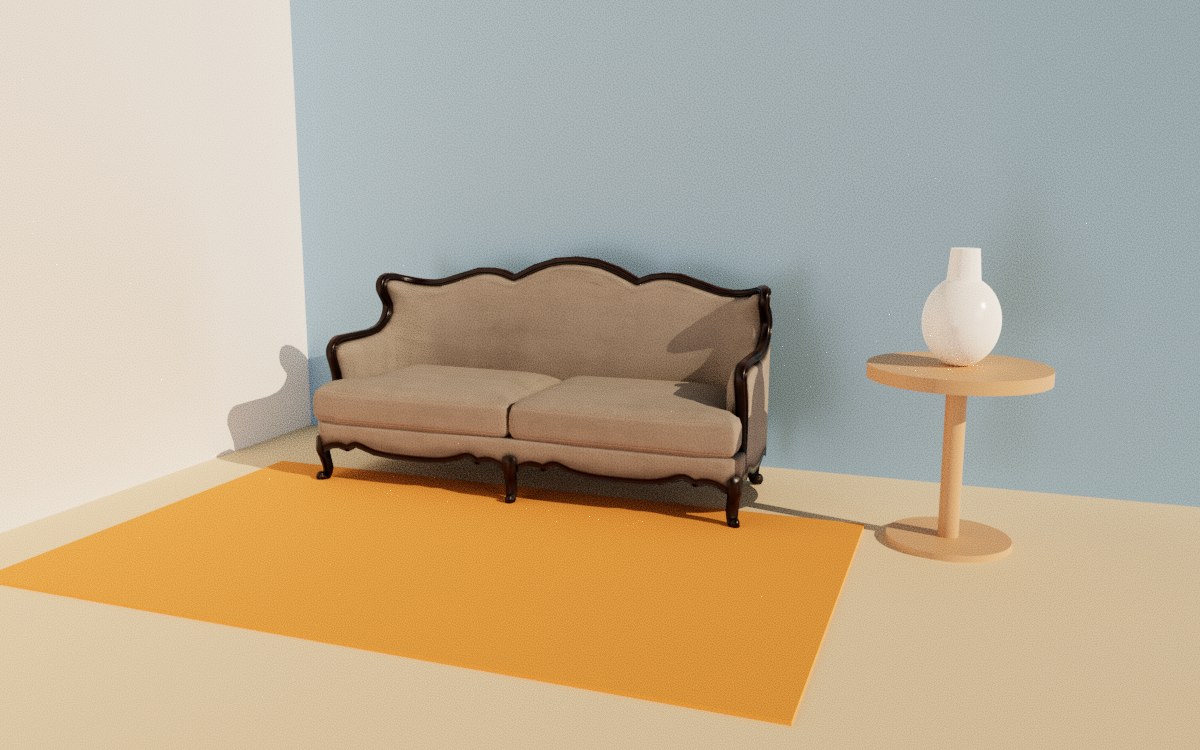
Light the scene with an HDRI and a sun
The path tracer lights the scene with scene.environment and the lights in it, so an HDRI and one directional light are enough for a room.
const environment = await new HDRLoader().loadAsync('/hdri/studio.hdr');
environment.mapping = THREE.EquirectangularReflectionMapping;
scene.environment = environment;
scene.environmentIntensity = 0.2; // the sun does the lighting, the studio HDRI only fillsconst sun = new THREE.DirectionalLight('#ffe2c0', 3.5);
sun.position.set(3.2, 1.8, 0.8);Give the path tracer the HDRI itself. It does not need PMREMGenerator, which only blurs the map for the three.js viewport. It traces DirectionalLight, PointLight, SpotLight and RectAreaLight. It leaves out AmbientLight and HemisphereLight, so light the room with the HDRI instead.
You do not need shadow maps for the path traced picture. Every object casts a real shadow. To stop one object from casting a shadow, set castShadow = false on its material.
The picture is grainy at first
Each sample adds another set of light paths to the picture, so it starts grainy and the grain fades as the samples add up.
pathTracer.samples tells you how many samples the picture has. By default the path tracer splits each sample into 3 by 3 tiles, one tile a frame, so the page stays responsive while it traces. To trace faster on a fast GPU, set pathTracer.tiles.set(1, 1).
To make it lighter on a phone or an older laptop, do the following.
- Set
pathTracer.renderScaleto0.5to trace at half the canvas size. - Lower
pathTracer.bouncesfrom its default of 10. Fewer bounces trace faster and make the corners darker. - Set
pathTracer.filterGlossyFactorto around0.5if you see bright single pixels on shiny surfaces.
Update the picture when something changes
The path tracer keeps adding samples to the same picture, so tell it when the camera, a material, a light or the environment changes. It then starts the picture again.
// The camera moved, so start the picture again from the new view.
function cameraMoved() {
  pathTracer.updateCamera();
}

// A shopper picked another rug color, so trace the picture again with it.
function setRugColor(color: string) {
  rugMaterial.color.set(color);
  pathTracer.updateMaterials();
}
Each change has its own call.
| You changed | Call |
|---|---|
The camera's position, rotation, fov or aspect | pathTracer.updateCamera() |
| A color, a texture or a setting on a material | pathTracer.updateMaterials() |
| A light's color, intensity or position | pathTracer.updateLights() |
scene.environment, scene.background or their intensity | pathTracer.updateEnvironment() |
| A mesh added, removed or moved, or a new material | pathTracer.setScene(scene, camera) |
Right after a change the picture is grainy again, as it was at the start.
Save the path traced picture
Wait until pathTracer.samples hits your target number. Then draw one more sample and read the canvas in the same task.
// Wait for enough samples, then save the canvas as a PNG.
async function savePathTracedImage(samples: number): Promise<Blob> {
  while (pathTracer.samples < samples) {
    await new Promise(requestAnimationFrame);
  }

  // Draw the latest sample and read the canvas in the same task, before the browser clears it.
  pathTracer.renderSample();
  return new Promise((resolve, reject) => {
    renderer.domElement.toBlob((blob) => (blob ? resolve(blob) : reject(new Error('toBlob failed'))), 'image/png');
  });
}
By default three.js creates its renderer with preserveDrawingBuffer: false because it's more performant. That is why the code reads the canvas right after it draws. The three.js screenshot article explains how to save a bigger picture and a transparent background.
In React Three Fiber
Wrap WebGLPathTracer in a small component that traces in useFrame and restarts when OrbitControls moves the camera.
function PathTracer() {
  const gl = useThree((state) => state.gl);
  const scene = useThree((state) => state.scene);
  const camera = useThree((state) => state.camera);
  const pathTracer = useRef<WebGLPathTracer | null>(null);

  useEffect(() => {
    const tracer = new WebGLPathTracer(gl);
    tracer.setScene(scene, camera);
    pathTracer.current = tracer;
    return () => tracer.dispose();
  }, [gl, scene, camera]);

  // A priority above 0 tells R3F to stop drawing the scene itself.
  useFrame(() => pathTracer.current?.renderSample(), 1);

  return <OrbitControls target={[-0.05, 0.45, -0.4]} onChange={() => pathTracer.current?.updateCamera()} />;
}
Put <PathTracer /> last inside the <Canvas>, after the models and drei's <Environment>. The canvas waits for the models to load, so the path tracer sees the whole scene when it starts.
<Environment files="/hdri/studio.hdr" environmentIntensity={0.2} />drei has no path tracing component. pmndrs publishes @react-three/gpu-pathtracer as a ready-made wrapper, but its version 0.3.2 depends on three-gpu-pathtracer 0.0.23, one release behind the one used here.
The drawbacks of path tracing in the browser
Path tracing in the browser runs on your visitor's own device, so how fast the picture gets clean depends on their GPU. A desktop with a good graphics card clears the grain in a few seconds. A laptop takes longer, and a phone can take much longer while it gets warm and drains the battery.
The page also has to stay open the whole time. If the visitor switches to another tab, the browser stops drawing frames and the tracing stops with them. While it traces, the GPU is busy with samples, so the rest of the page feels slower, and the path tracing shader takes a few seconds to compile before the first sample shows.
That is fine for a preview on a desktop. It is hard to rely on when every shopper needs a clean picture of what they built, on whatever device they have.
How to make it look even better on every device
Render the picture on a server instead of on the shopper's device. Bakery3 renders the same scene on a GPU server with a path tracer, and that takes care of each drawback above:
- The picture is as clean on a phone as on a desktop, because the shopper's device only draws the normal three.js viewport.
- The phone stays cool and keeps its battery.
- The render keeps going on the server when the shopper switches tabs.
- The page stays responsive, with no path tracing shader to compile first.
The serverside renderer takes your scene including objects, materials, HDRI and lights, and hands you back a rendered image. Connect it once, then ask for an image whenever a shopper change a configuration.
// An API key while you test. In production, use a token from your server instead:
// https://bakery3.com/docs#let-your-users-render-without-exposing-your-api-key
const bakery3 = createBakery3({ apiKey: 'bk_sk_…' });
bakery3.attach({ scene, camera, renderer });async function renderOnServer(): Promise<string> {
const job = await bakery3.render({ width: 1200, background: { type: 'color', color: '#e9e7e2' } });
const { url } = await job.result();
return url;
}An HDRI you load yourself needs one more line, so the render is lit by the same file as the viewport.
rememberEnvironmentSource(environment, '/hdri/studio.hdr');Render image covers the size, the quality and the background, and the quickstart connects your scene in a few lines.
Common questions
Does three.js have a built-in path tracer?
No. The three.js WebGLRenderer draws each frame in real time and simplifies how light bounces. The three-gpu-pathtracer library by Garrett Johnson adds a path tracer that runs on the same WebGLRenderer, using WebGL 2 and three-mesh-bvh.
Is three-gpu-pathtracer real time?
Not the same way the three.js viewport is. It adds one sample to the image each frame, so the image looks grainy at first and clears up over a few seconds. When you move the camera or change a material, it starts the image over.
Which lights does three-gpu-pathtracer support?
It traces DirectionalLight, PointLight, SpotLight and RectAreaLight, plus the scene's environment map. AmbientLight and HemisphereLight are left out, so light the scene with an HDRI on scene.environment instead.
How do I save a path traced image from three.js?
Wait until pathTracer.samples hits your target number. Then call pathTracer.renderSample() one more time. Right after that, call canvas.toBlob() in the same task. Reading the canvas later returns an empty picture unless the renderer was created with preserveDrawingBuffer: true.
Can I path trace a three.js scene on a server?
Yes. A path tracer needs a GPU and time, so a server works well when the image is for a cart, an email, or a product page. Bakery3 reads your three.js scene in the browser, renders it on its own GPUs, and returns the image.