
Bake a scene
Baking renders realistic light and soft shadows and saves them as textures on your objects, called lightmaps. Your scene stays a live Three.js scene, so your users can still orbit it.
import { createBakeSession } from '@oeave/bakery3/bake';

bakery3.attach({ scene, camera, renderer });

const job = await bakery3.bake();
const { bundle } = await job.result();
// {
//   objects: [{ objectId: 'floor', lightmap: { uri, format: 'exr', size: 1024 }, uv, … }],
//   skipped: [],
//   probe: { uri, … },
//   …
// }

const session = createBakeSession({ scene });
await session.apply(session.addGeneration(bundle));

session.revert();   // back to your scene, exactly as it was
bake() reads your scene the way render() does and returns a job, with the
same job.on('progress', …) and job.cancel(). The bundle holds one lightmap
per object, and the session puts them on your meshes. The URLs in a bundle
expire after 24 hours: call bakery3.getBake(job.id) and then result() for
fresh ones.
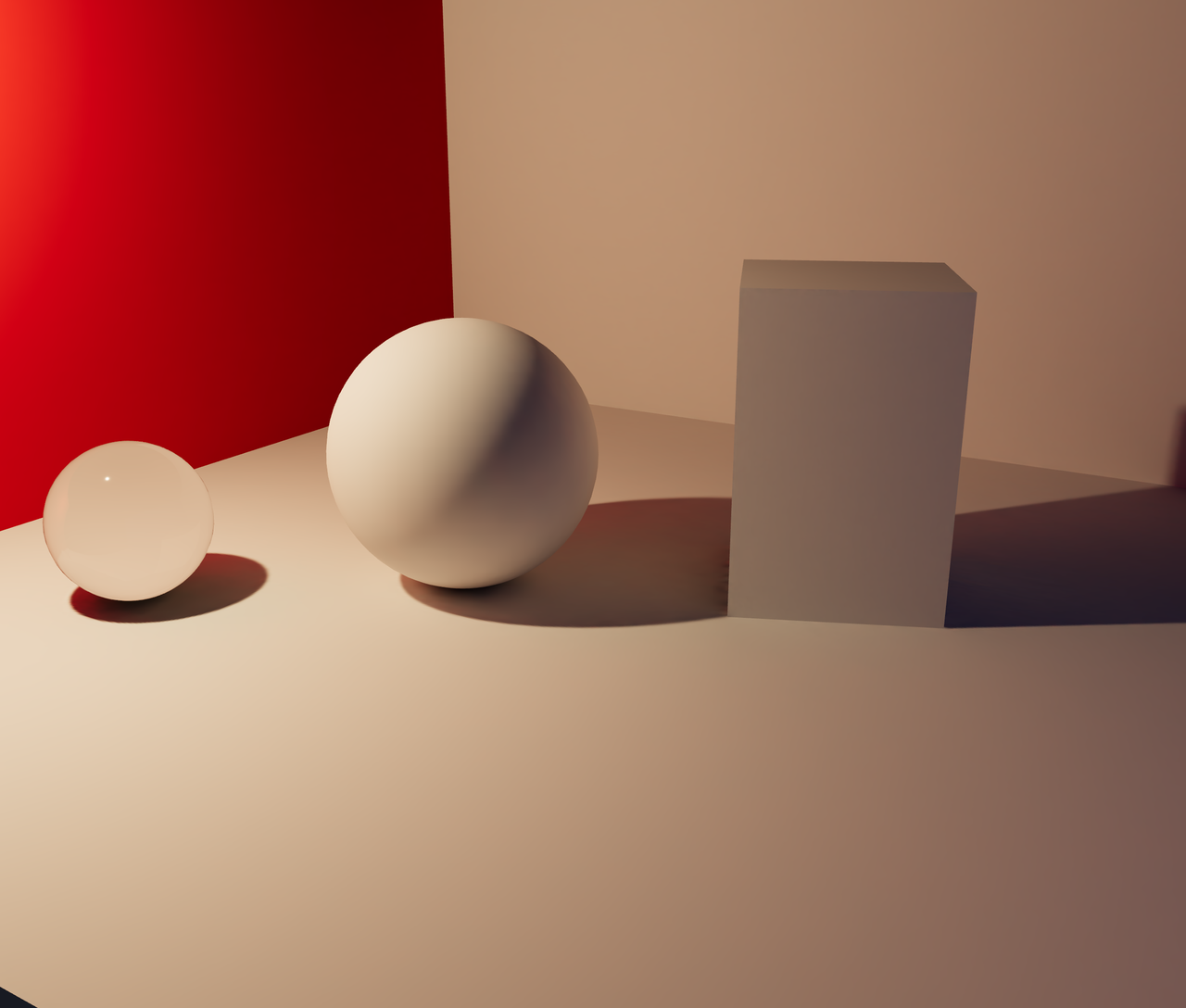 Baked GI
Both frames are the real-time viewport. The second is the same scene after a traced bake was applied as lightmaps. Still interactive, still your meshes, and revertible in one call.
up to 512² lightmaps·standard quality·6 object(s) lit·2% of seams in view·3.3 MB to interact
Choose what gets baked
With no settings, every mesh that can hold a lightmap is baked. Glass, hidden
objects and objects marked userData.bakery3.bake = false are left out unless
you name them in include. Instanced, batched and skinned meshes cannot be
baked.
const job = await bakery3.bake({
  settings: {
    include: ['wall-north', 'floor'],   // omit to bake every default object
    exclude: ['kettle'],                // removed from the list above
  },
});
An id is the object's userData.bakery3Id, or its uuid if you have not set
one. Three.js makes a new uuid on every reload, so set userData.bakery3Id
on the objects you name.
session.candidates() lists every mesh and says why one is left out:
for (const candidate of session.candidates()) {
  candidate.objectId;        // the id to use in include and exclude
  candidate.bakeable;        // false: it cannot hold a lightmap at all
  candidate.defaultInclude;  // false: left out unless you include it
  candidate.reason;          // { code, message, why, fix } when it is left out
}
A room preset is only baked if you create it with
createPresetRoom(name, { bake: true }).
Bake options
Everything goes in settings, and all of it is optional.
| Option | Default | What it does |
|---|---|---|
quality | 'standard' | 'preview', 'standard' or 'high'. Use 'preview' while you try things out. |
textureSize | 1024 | The largest lightmap an object can get: 256, 512, 1024 or 2048. Small objects get smaller ones. |
sizes | none | A size per object, such as { floor: 2048 }. |
include, exclude | every default object | See above. |
atlas | off | One shared lightmap for every object. See below. |
room | 'preset' | 'full' bakes a preset room's own surfaces too. See below. |
simplify | none | Swap heavy objects for light stand-ins. See below. |
view | 'camera' | Where your users look from. See below. |
margin | 4 | Pixels of padding around each piece of a lightmap. |
deliverGlb | false | Also return a standalone .glb. See below. |
Next to settings, bake() takes maxCost, metadata, idempotencyKey and
onUpload, the same as render(). One bake can cover up to MAX_BAKE_OBJECTS
objects and MAX_BAKE_TEXELS lightmap pixels, both exported from
@oeave/bakery3/bake.
To bake with a worker of your own, pass a bakeTransport to the
dev panel. It hands your function
the bake request and its files.
Bake a whole room into one texture
By default every object gets its own lightmap. An atlas puts them all in one shared texture, so a room with many objects is one download.
const job = await bakery3.bake({
  settings: {
    atlas: { size: 2048, weights: { 'sofa-hero': 4 } },
  },
});
atlas: true is a 2048 atlas. The sizes are 1024, 2048 and 4096. weights
gives an object more of the texture: a weight of 4 is twice the side and four
times the area, and weights round to the nearest power of two.
An atlas costs the same as separate lightmaps with the same number of pixels. The drawback is that every object shares one texture, so each gets less detail. Choose 4096 for a large room, or bake the hero object on its own.
Bake a product in a ready-made room
If your scene uses a preset room and you have not changed it, the room's own lighting is already baked. Your bake covers your product, the stand it is on and the shadow it casts.
const room = createPresetRoom('living_evening');
scene.add(room, product);

const job = await bakery3.bake();   // two objects, not forty
That is the default whenever it applies. On the room above it is 75 GPU seconds instead of 500, because the walls, the floor, the ceiling and the furniture are the same for everyone who picks that room and we baked them once, at a quality nobody would pay for per bake.
The room in your viewport is that baked room already (see
Rooms that arrive already lit), so
session.apply() only has to put your own lightmaps on:
const report = await session.apply(generation);
report.applied;  // your product and the stand
report.shadow;   // true
A room shown as a stand-in with bake: true works the same way when it has
pre-traced lightmaps: session.apply() fetches them and puts them on with
yours, and report.room says how many surfaces they covered.
Your product is still lit by the whole room. The renderer rebuilds it around your scene at full quality, the same way it does for an ordinary render, so the light bouncing onto your product comes off the real floor and the real walls. None of that room is uploaded: your scene sends your product, and the stand under it when we are re-baking that.
You get the full room bake instead when you have changed the room, because
its light is then not the light we baked. Changing the materials, what is
outside the windows, or the stand does it. So does settings: { room: 'full' },
which you want if your product throws light of its own: a lamp, a screen, or
anything emissive.
What this trades. The ready-made room never saw your product, so light
your product THROWS is missing: a red vase does not tint the wall behind it.
What it BLOCKS is measured and does arrive, which is the contact shadow that
makes it look like it is standing in the room. Bake in 'full' mode when
that is not enough.
Replace heavy objects with light ones
A bookcase at the back of the room does not need forty meshes, and a potted
plant does not need half a million triangles. simplify swaps them for
something lighter and paints the detail back on.
const job = await bakery3.bake({
  settings: {
    simplify: [
      { objects: bookcase, to: 'box' },
      { objects: [palm, monstera], to: 'billboard' },
      { objects: statue, triangles: 800 },
      { objects: sofa, to: sofaLowPoly },
    ],
  },
});
objects takes an object, a group (every mesh under it), an id, or a list of
those.
to | What you get |
|---|---|
'lowpoly' (default) | One low-poly mesh wrapped around the objects. triangles sets how many, 1500 if you leave it out. |
'box' | The box around them, turned to fit. Good for bookcases, cabinets and radiators. |
'billboard' | One upright picture that turns to face the camera. Good for plants. |
'decimate' | Each object with fewer triangles, keeping its own materials. triangles is per object, 20000 if you leave it out. See Make your product lighter. |
a Mesh | Your own low-poly model. It does not have to be in the scene. |
A mesh stand-in comes back with three textures: the color of the objects it
replaces, a normal map for the detail it lost, and a lightmap traced on the
real objects, so a shelf in shadow stays in shadow. textureSize on an entry
sets their size.
You can also mark the object itself, which is handy when the mark should travel with the model:
bookcase.userData.bakery3 = { simplify: 'box' };
palm.userData.bakery3 = { simplify: { to: 'billboard', textureSize: 512 } };
A stand-in replaces objects the bake covers. If you pass include as well,
name those objects in it too: a stand-in in settings.simplify for objects
the bake leaves out is refused, with their names. A mark on an object the bake
leaves out is skipped, since the mark only says how to bake it when it is
baked.
Keep the pot, flatten the leaves
A whole plant on one card looks wrong on the floor. The shadow a plant lays down is a pool as wide as its leaves, and a card has no width, so half that pool ends up in front of the plant. Split it: the planter stays as a solid, which is what the shadow sits around, and the leaves go on the card.
bakery3.bake({
  settings: {
    simplify: [
      { objects: [palm.pot, palm.gravel], to: 'lowpoly', group: 'palm-pot' },
      { objects: palm.leaves, to: 'billboard' },
    ],
  },
});
group puts several entries into one stand-in. Use it when the meshes you
want together do not share a parent you could name instead, like the books on
a bookcase whose shelves you want to keep.
A preset room already does both of these for its own furniture, so you get them without asking. See Presets.
What a stand-in should not replace
Not the piece you can see into. A bookcase flattened to a box stops reading as a bookcase, because the eye is looking for depth between the shelves. Leave the carcass and stand in for what fills it.
Surfaces nobody can see are not the saving you might expect either. A bake already gives a face turned away from your camera about a tenth of the texels of one facing it, so the back of a wall and the inside of a closed base cost almost nothing to begin with.
The real objects are still in the bake. They cast their shadows on the wall and
bounce light onto the floor as before. session.apply() hides them and adds
the stand-ins, and session.revert() puts everything back. The report lists
them as standIns and replaced.
A replaced object gets no lightmap of its own, so a room usually costs less
with simplify than without. Each mesh stand-in is priced as three objects and
each billboard as one.
The drawbacks: a billboard shows one side of a plant, so it looks flat when you
walk all the way around it, and its shadow on the floor was cast by the real
plant. Metal and glass come out as paint of the same
color, with no reflections of their own. And a stand-in cannot be animated or picked apart. For the product itself, use 'decimate'.
Make your product lighter
A scanned or store-bought model often carries far more triangles than a page
needs: a pair of sneakers can be 300,000. 'decimate' bakes the product onto
a copy of itself with fewer triangles and puts that copy in the scene.
const job = await bakery3.bake({
  settings: {
    simplify: [{ objects: sneakers, to: 'decimate', triangles: 20000 }],
  },
});
The copy keeps what makes the product look like itself: every part, its outline, and its own materials with all their textures at full size. Only the light is baked onto it, traced at the real surface, so it costs one pass per object instead of three.
Each mesh under objects becomes a copy of its own, so a pair of shoes is two.
The copy wears the reflection probe,
as the full model would. session.revert() puts the full model back.
The drawback: fine detail that lived only in the shape, like stitching modeled
as geometry, is softened. Detail in the textures is kept. Try the default and
lower triangles until you can see the difference, then go one step back up.
Hide the seams from your camera
A lightmap has seams, faint lines where two pieces of the texture meet. We put
them where they show least, as seen from view and as your users orbit around
it: along sharp edges, underneath, and on the far side.
view | What it means |
|---|---|
'camera' (default) | The attached camera, rounded to a coarse direction and distance. |
'none' | No viewpoint. Seams go underneath and along sharp edges. |
{ position: [x, y, z] } | A point in scene units. |
Baking again after the camera moves is a new bake, with its own price.
Use the lightmap UVs your model already has
If your model has a second UV set made for lightmaps (uv1 in three.js,
TEXCOORD_1 in a .glb), the bake puts the light on it. Most 3D tools can
export one. You get your own seams, and the page downloads no extra UV data.
Models built from many small parts, like a sneaker with its stitching and eyelets, are hard to cut into one clean layout. For those we use the model's texture UVs instead, which usually follow the panel edges.
We check a layout before using it. Every piece has to sit inside the square, no two pieces can overlap, and each piece has to be big enough to hold light. Artists often stack identical parts on one piece of a texture, such as four chair legs, and that fails the check because the legs are lit differently. When a layout fails, we cut the model ourselves, as above.
Each baked object says which layout it got:
for (const object of bundle.objects) console.log(object.objectId, object.layout?.cut);layout.cut | Layout |
|---|---|
'uv1' | Your model's lightmap UVs. |
'uv0' | Your model's texture UVs. |
'hidden' | Ours, with the seams hidden from view. |
'angle' | Ours, cut at sharp angles. Used when the hidden-seam layout fails. |
See what a bake costs before you run it
const quote = await bakery3.estimate({
  bake: { quality: 'standard', textureSize: 1024, exclude: ['kettle'] },
});
// { estimatedCost, maximumCost, estimatedSeconds, … }

const job = await bakery3.bake({
  settings: { quality: 'standard', textureSize: 1024, exclude: ['kettle'] },
  maxCost: 3,   // refuse before uploading if the quote is higher, in USD
});
The price follows the total number of lightmap pixels and how heavy the scene
is, plus a fixed cost per object. deliverGlb is a second pass over every object, so it roughly doubles
the price. See Estimating a bake.
What baking is good for
Baking is a great fit for virtual showrooms, real-estate walkthroughs and physical products that the user simply wants to spin around in the browser.
It works really well for scenes with static objects. The drawback is that if an
object moves, its baked light and shadows don't update. Leave a moving object
out with exclude, and it keeps its live lighting.
Compare, switch and revert
Every bundle you add is a generation. You can switch between them, compare one with your live scene, and go back to the scene exactly as it was.
const index = session.addGeneration(bundle, { label: '1024 · standard' });

await session.apply(index);   // goes back to live first, then applies

session.compare(true);        // show the live scene under the applied bake
session.compare(false);       // show the bake again

session.muteLights(true);     // set your lights to zero, to see the bake alone
session.revert();             // back to your scene, exactly
session.dispose();            // revert, free every texture, restore the lights
You can bake again with a bundle applied. The new bake starts from your scene as it is without the applied bake, so it never bakes over the old one.
Only the most recent generations keep their textures in memory
(residentGenerations, 3 by default). Older ones load again when you apply
them. session.on('change', listener) fires when any of this changes, so your
own UI can follow. The dev panel has it all in its Bake
tab.
If your scene changed after the bake, apply() still applies what matches and
reports the rest:
const report = await session.apply(index);

report.applied;    // objectIds that got their lightmap
report.unmatched;  // baked objects that are no longer in the scene
report.unbaked;    // meshes in the scene this bake has no lightmap for
report.skipped;    // objects that were refused, each with a reason and a fix
report.probed;     // objectIds that got the reflection probe
Leave your lights on
A lightmap already holds all the soft light on a surface, including the light from your lamps and your environment map. The session uses it instead of that light, and your lights only add highlights and reflections. You do not need to turn them off.
An aoMap on a baked object darkens only its highlights. The lightmap already
holds the shadow in every crevice, so the session does not darken it twice.
createBakeSession({ scene, shading: 'replace' });   // the default
createBakeSession({ scene, shading: 'add' });       // Three.js's own behavior
With 'add', the lightmap is added on top of your lights, so their light is
counted twice until you call muteLights(true). Use it only for a bake that
holds part of the light.
Reflections on objects you keep live
A lightmap holds no reflections. A product you leave out of the bake, so it can
turn or change finish, would go on reflecting your old environment map and not
the baked room. So every bake also returns a reflection probe: a small 360°
picture of your scene, taken from where that product stands. apply() sets it
as envMap on the objects the bake did not light, and revert() takes it off.
You do not have to do anything.
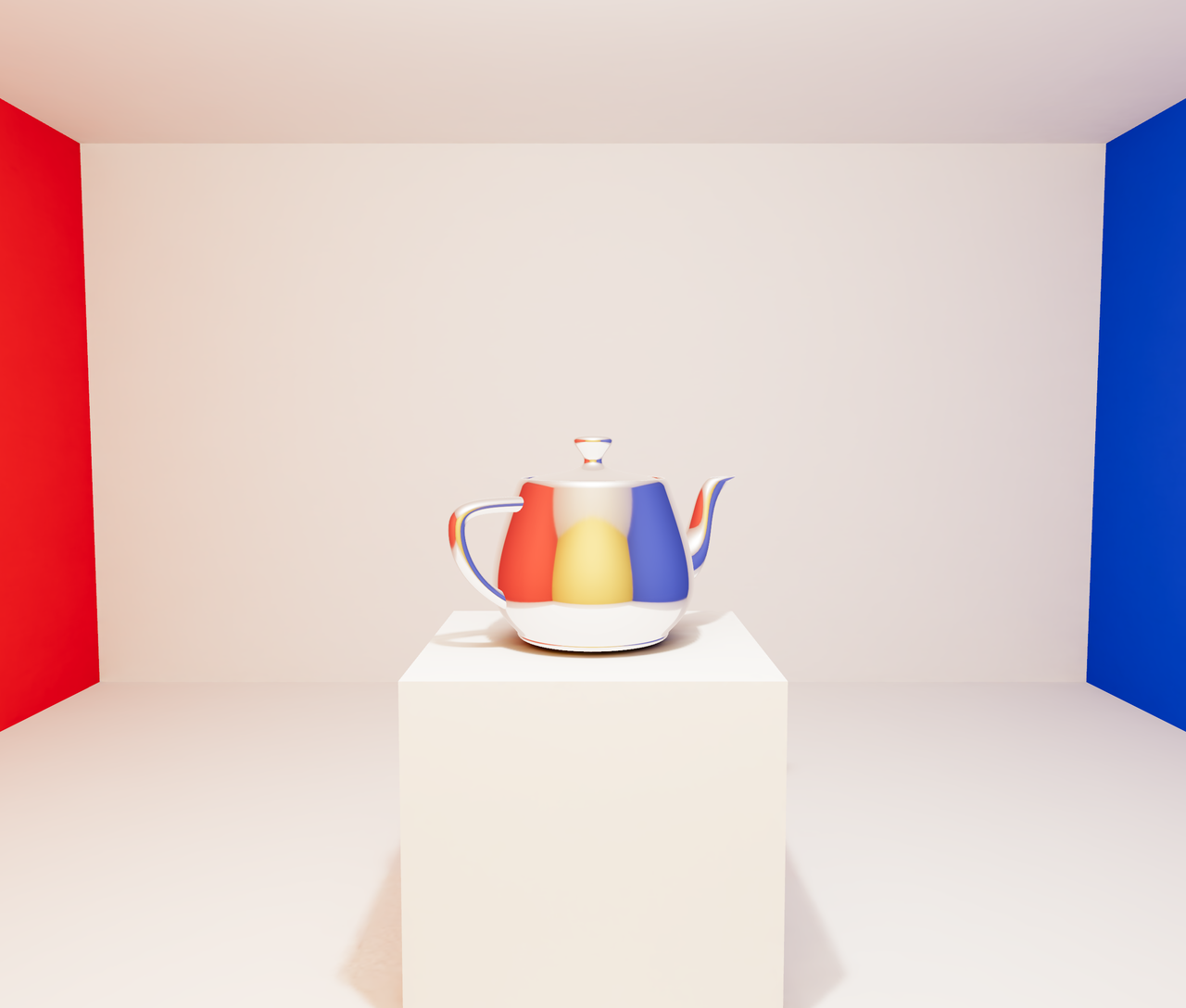 Baked, with the probe
Both frames are the real-time viewport with the same bake applied: the room is lightmapped, the polished teapot is kept live. First it reflects the scene's own environment, which a room lit by one lamp does not have. Then it carries the reflection probe the bake rendered from where it stands: red round the flank that faces the red wall, blue round the one that faces the blue, and across its front the yellow wall behind the camera, which the viewer never sees directly.
up to 512² lightmaps·standard quality·7 object(s) lit·512×256 probe on 1 object(s)·0% of seams in view·4.4 MB to interact
Both frames have the same bake applied. The only difference is the probe on the teapot. This is the probe it is wearing:
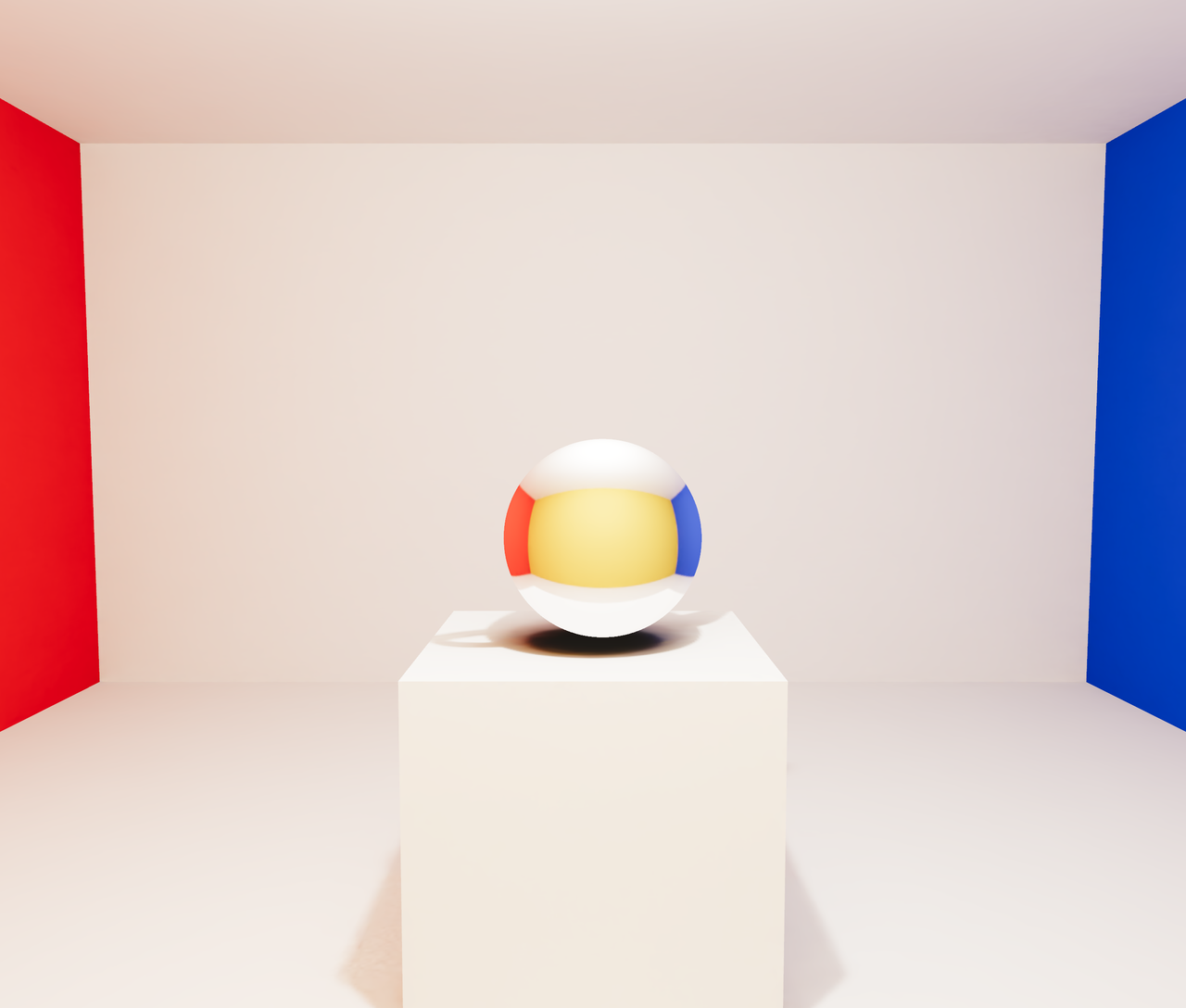 On a sphere, where it was taken
Here the teapot is hidden and a ball stands in its place, painted with the
probe by direction: every point on it shows what the probe saw looking that
way. The side facing the red wall is red, the side facing you is the yellow
wall behind you, and the top is the ceiling. Below is the same picture
unwrapped, the way probe.exr stores it: one full turn from left to right,
floor at the bottom, ceiling and the lamp's glow at the top. The teapot itself
is nowhere in it; the dark patch left on the plinth is its shadow in the baked
light.
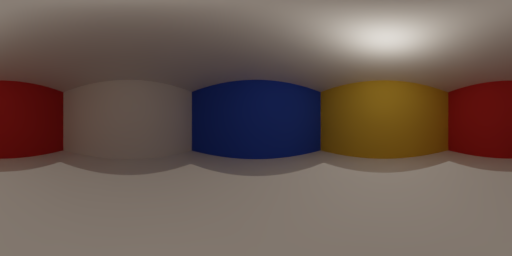 The same probe, unwrapped · probe.exr
- 1. red wall
- 2. back wall
- 3. blue wall
- 4. behind the camera
- 5. red wall
- the marker lines, left to right
512×256 equirectangular·taken from (0.03, 1.20, -0.01)·1 object(s) hidden·preview exposed ×0.09
Glass, instanced and skinned meshes get the probe too. If you left nothing out, it is taken from the middle of the baked objects.
The probe is taken from one point, so reflections are believable, not exact,
and a product does not reflect its own parts. For exact reflections,
render an image. If a color is missing from a reflection,
open bundle.probe.preview.uri, a PNG of the probe. A metal tints what it
reflects, so the color is often in the probe and the material hides it.
createBakeSession({ scene, probe: false });   // never downloaded, never applied

await session.setProbe(false);   // off under an applied bake, at once
await session.setProbe(true);    // and back on
With the probe off, every material keeps the environment map you gave it.
Download a .glb with the light baked in
deliverGlb: true adds bundle.glb, a file that looks like the render in any
Three.js scene or glTF viewer, with no lights and no SDK. Color, light and
reflections are painted into one texture per object.
const gltf = await new GLTFLoader().loadAsync(bundle.glb.uri);
gltf.scene.traverse((object) => {
  // The texture is already tone mapped. Do not let the renderer do it again.
  if ((object as Mesh).isMesh) ((object as Mesh).material as Material).toneMapped = false;
});
scene.add(gltf.scene);- Reflections are painted on from the
viewpoint, so they stay put when someone orbits. - Your textures are baked in at the lightmap's size. Raise
textureSizeorsizesfor a finely textured floor. - Only baked objects are in the file. Glass and anything else the bake left out are not.
Load the textures with your own code
Pass a textureFactory if you need your own fetch, such as a CDN that needs a
login, or a test.
import { configureBakeTexture, createBakeSession } from '@oeave/bakery3/bake';

createBakeSession({
  scene,
  textureFactory: async (source) => {
    const texture = await myLoader.load(source.url, source.format);
    // Sets the UV channel, color space and filtering this texture's role
    // needs: a lightmap, a stand-in's own maps, the shadow or the probe.
    return configureBakeTexture(texture, source);
  },
});